


Welcome back to Design Picks — here’s what’s inside this week.
This week is a masterclass in dark mode done right — Jamie Syke’s inbox redesign uses card rotation as a visual cue (something I haven’t seen anyone else attempt), and a sports tracker from Mattia brings gaming-inspired UI to a category that usually plays it painfully safe. There’s also a health dashboard from Jin where one small icon placement decision completely changes how you scan the page — a technique you can steal for any card-based layout.
Across all seven picks you’ll find tips on building brand personality without a brand, selling upgrades through feeling instead of feature lists, and knowing when dark mode is a real design decision versus just a toggle. Plus, we’re introducing the all-time Global Leaderboard at the bottom — 31 issues of points, and the race at the top is tighter than you’d think.
Missed the last issue? Here's a quick look at Issue #29's picks.


#7 — Break label creator by Aether Aurelia
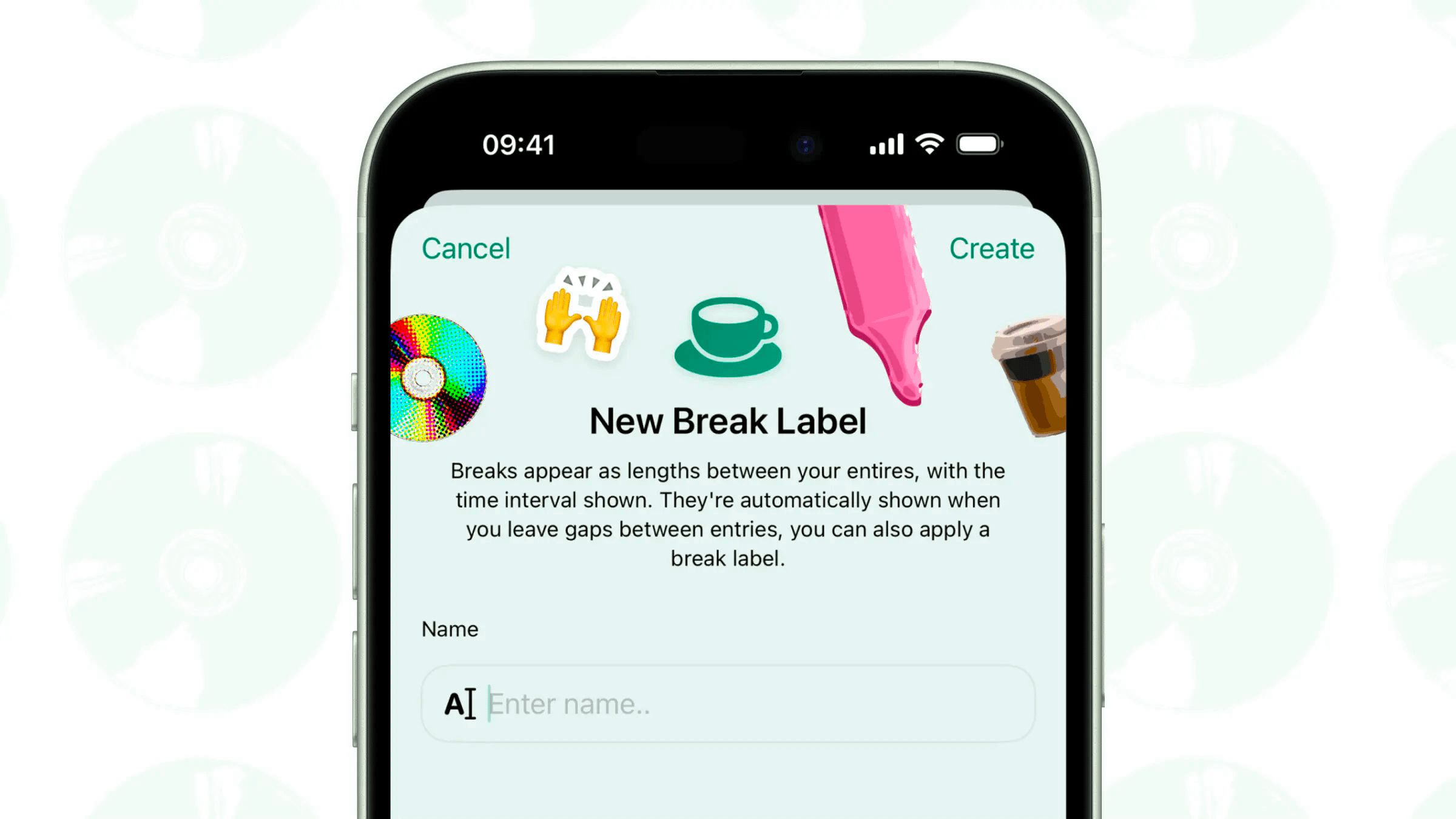
The stickers and emojis with white borders in the header turn what could be a bland scheduling screen into something with real brand personality — a great reference if you’re looking to inject character into an app that doesn’t have established branding yet.
+1 point · View on X
#6 — Premium upgrade offer by Metehan Turna
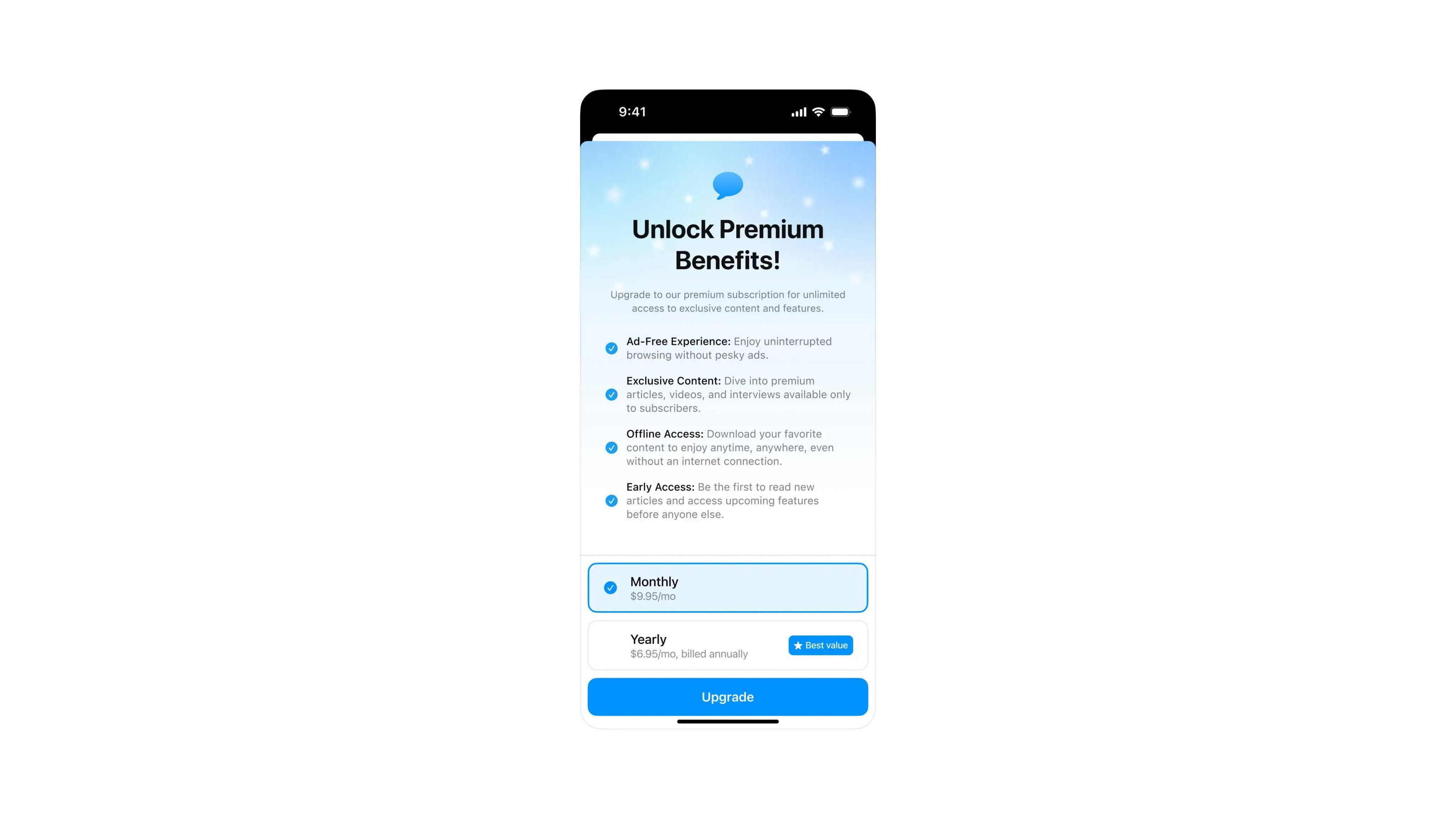
A paywall design that sells the feeling of upgrading rather than just listing features — the star gradient icon on the header gives it just enough visual personality, and you can tell from this screen alone that the full app behind it is clean and considered.
+2 points · View on X
#5 — Financial overview dashboard by Bagus Fikri
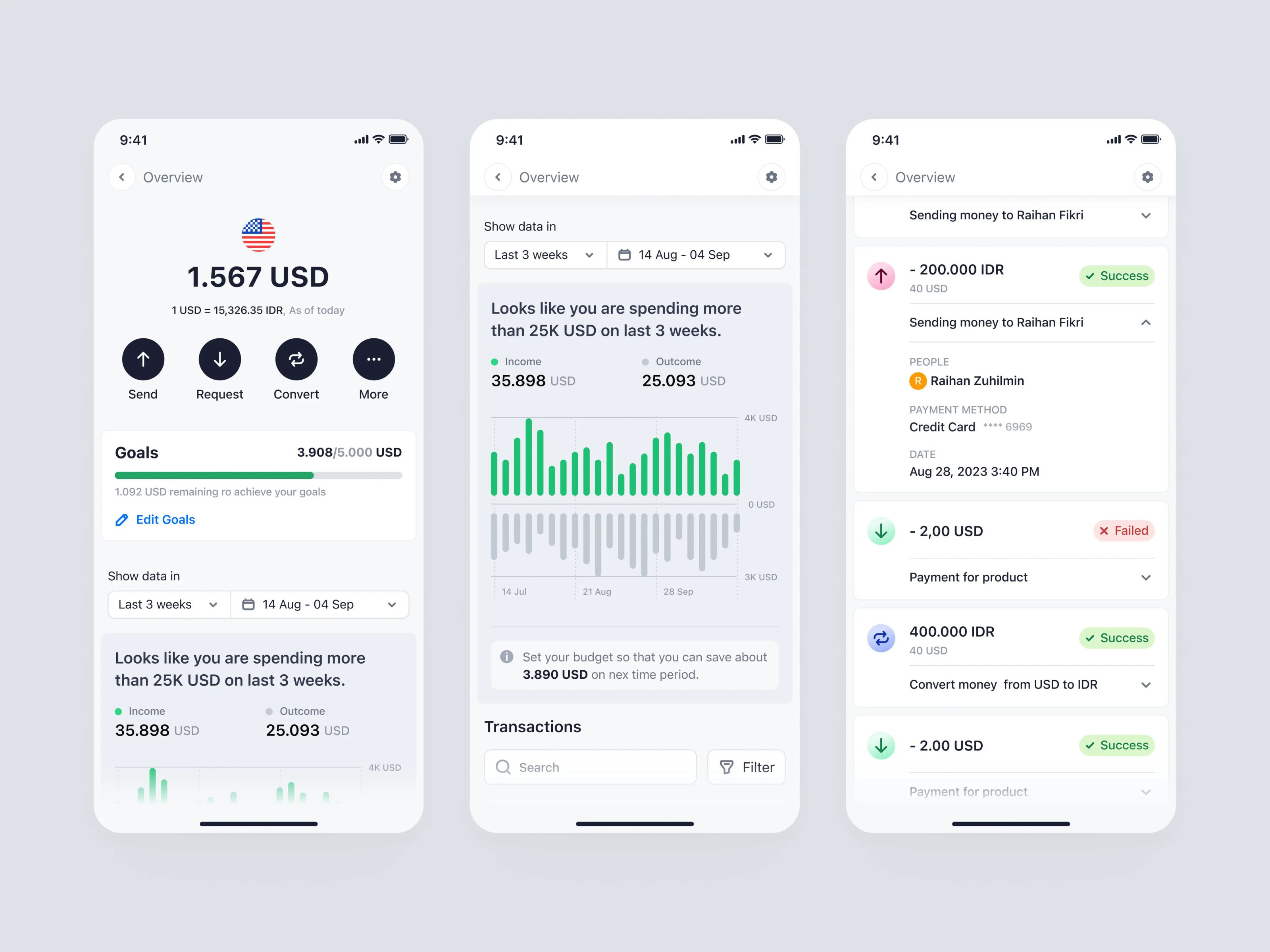
Very clean and very corporate, which is exactly what this user base needs — the little gradient on the transaction icons adds just enough playfulness to keep it from feeling sterile, and the outgoings graph is begging for a red accent to tap into the colour theory users already know.
+3 points · View on X
#4 — Smart home control by 0-1
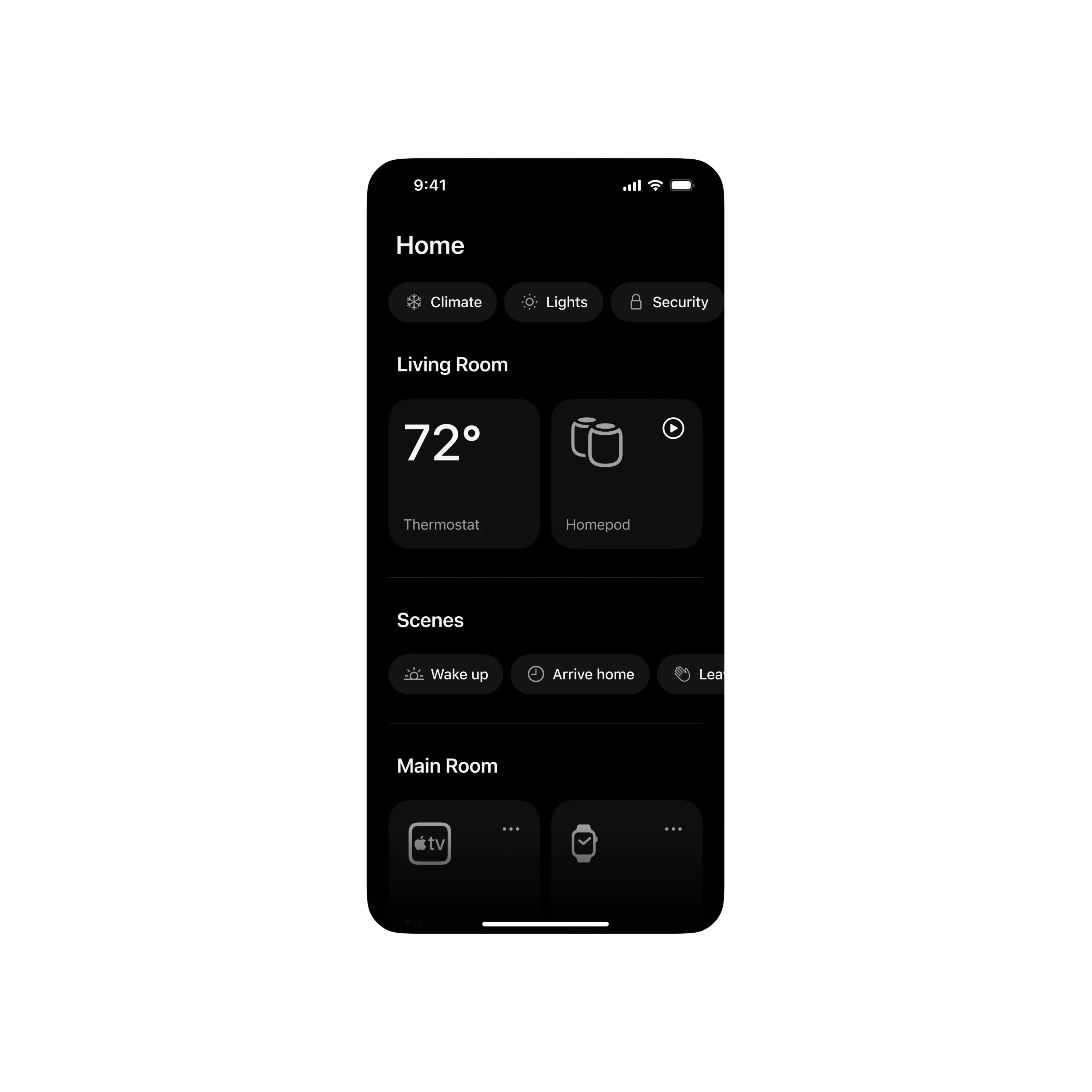
Large cards that let you tap and go — exactly what a home automation app needs — and the dark mode feels purposeful here, designed for those moments when you’re turning on lights at night and don’t want a bright screen in your face.
+4 points · View on X
#3 — Health insights dashboard by Jin 🥉
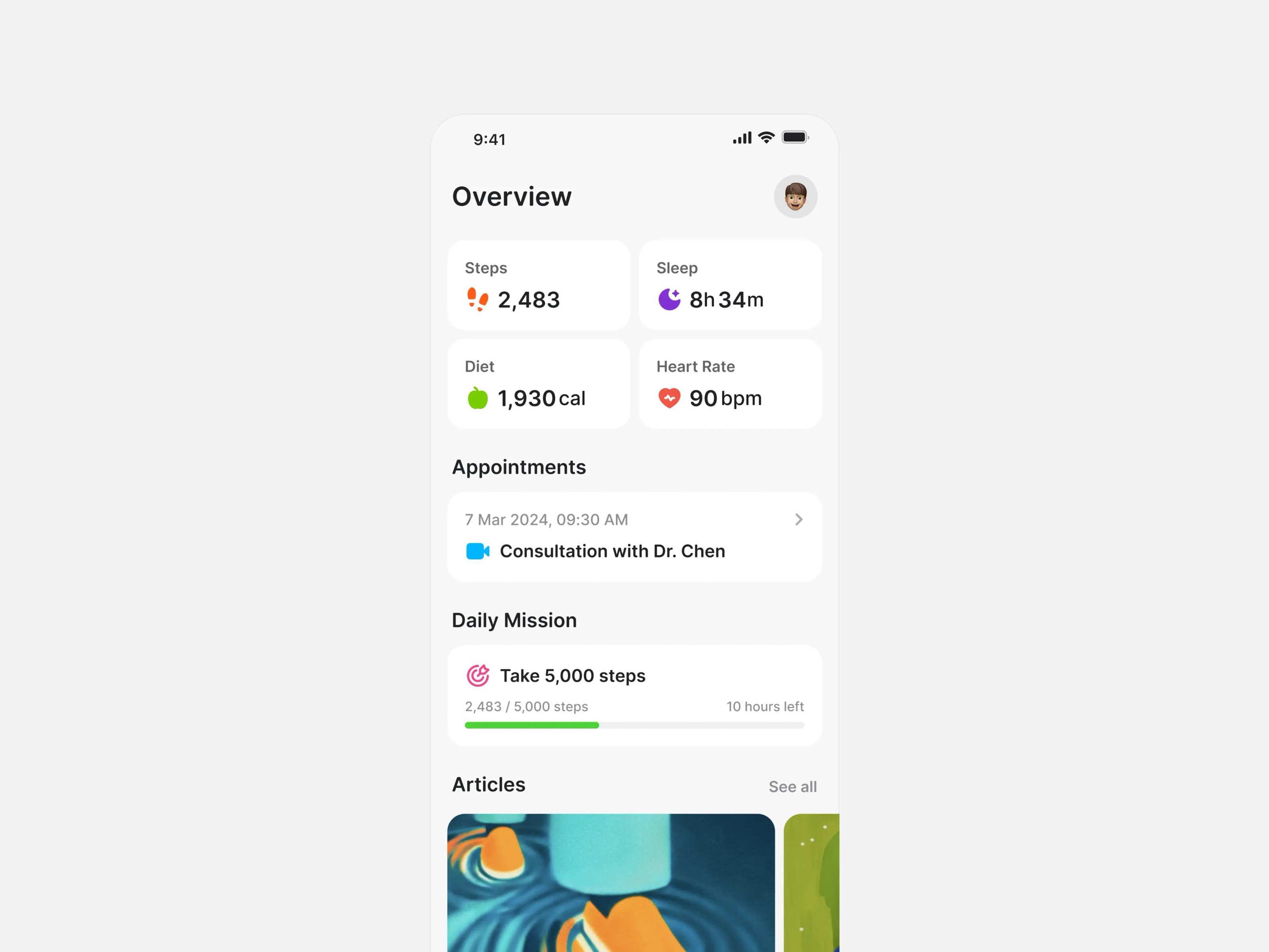
I don’t think we appreciate simple design enough anymore — and this is a perfect example of why we should. The standout detail here is the icon placement — normally the icon for each card sits in the header area in a muted grey, but Jin placed the heart rate icon, the sleep icon, and the rest as larger, more colourful elements right next to the text, and it completely changes how your eye moves through the dashboard. It draws you to the actual information instead of skimming past it, which is a small decision with a big impact on scanability. Steal this technique of pulling category icons out of the card header and placing them as bold, colourful elements beside the metric text — if you’ve got a card-based layout in your app, this single move could take it to a whole new level.
+5 points · View on X
#2 — Live sports tracker by Mattia 🥈
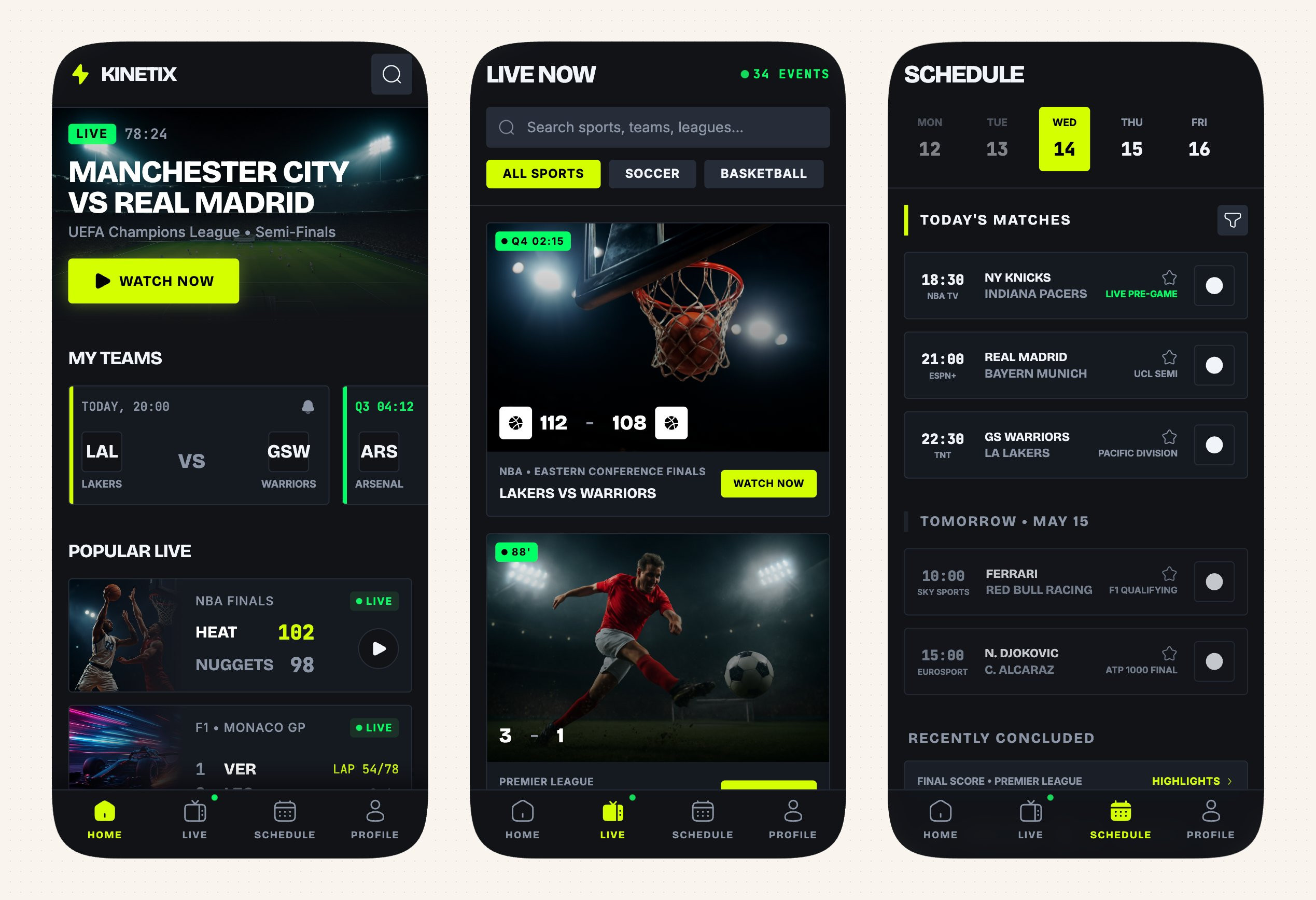
You don’t often see sports apps with this kind of gaming-like UI — they usually play it safe with generic interfaces because they need to reach a massive global user base, but this one is very opinionated and I’m here for it. The CTAs immediately draw your attention, and that’s exactly what they’re supposed to do — the button colours against that blue-shaded dark mode with the little borders around each card create a really well put together screen. There’s a mismatch worth noting though — the large, rounded, bouncy icons don’t quite suit this UI with its square corner radius buttons and tighter radiuses across the cards, so sharper icons would tie the whole system together better. But overall this is a great rendition of a sports application that brings genuine personality to a category that usually plays it way too safe.
+7 points · View on X
#1 — Dark communication hub by Jamie Syke 🏆
Design of the Week
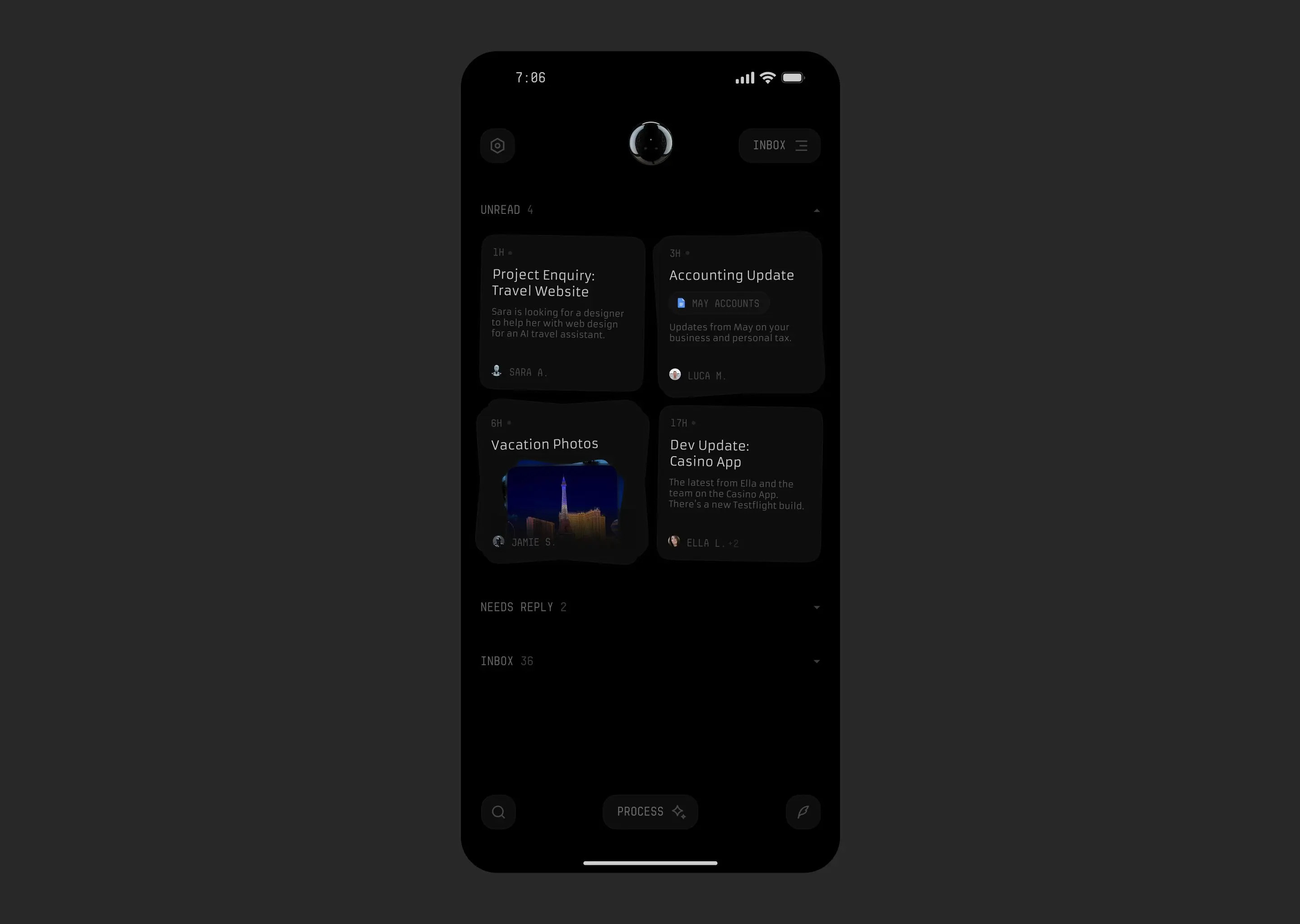
Jamie Syke is one of my favourite designers and this inbox redesign is exactly why — it’s an acquired taste, but the kind that makes you rethink what email apps should feel like. The dark mode here isn’t your standard inversion — it’s very dark, almost black, and the font choices lean into that atmosphere with a space-like headline typeface that gives the whole thing its own identity rather than defaulting to Inter or Manrope. What really catches my eye is the tilted note cards — if that tilt indicates multiple replies within a thread, that’s a brilliant little touch that also creates visual hierarchy between read and unread items. The tag buttons and inbox text sit in a dark grey rather than full white, which could hurt readability in direct sunlight, but that’s the tradeoff you accept with a dark mode this committed to its own mood. I love that this doesn’t look like every other email app — it pushes the mobile design genre forward instead of recycling the same patterns we’ve all seen a hundred times. Steal this technique of using card rotation as a visual indicator for thread depth or unread status — it’s a subtle spatial cue that adds dimension without adding clutter, and it’s something I haven’t seen anyone else do in messaging UI.
+10 points · View on X
📊 Leaderboard Update
This Week’s Points
🏆 #1 — Jamie Syke (@jamiesyke) · +10 pts
🥈 #2 — Mattia (@mattiapomelli) · +7 pts
🥉 #3 — Jin (@jincee_ui) · +5 pts
#4 — 0-1 (@0_1_design) · +4 pts
#5 — Bagus Fikri (@bagus_fikri) · +3 pts
#6 — Metehan Turna (@meturna) · +2 pts
#7 — Aether Aurelia (@AetherAurelia) · +1 pt
Global Leaderboard — Top 10
Studio Sphere holds the top spot at 80 pts — nearly double second place, with podium finishes in 9 of their 11 features. The studio is the one to catch. Meanwhile, every single designer in Issue #31 is a leaderboard newcomer — Jamie Syke makes a particularly strong debut, going straight to #1 on their very first feature.
🥇 Studio Sphere (@0xSphere) · 80 pts · 11 features · 3 wins
🥈 Ranjith (@align_all) · 42 pts · 7 features · 2 wins
🥉 Stats Studio (@statsdesign) · 29 pts · 4 features · 2 wins
4. Marco Cornacchia (@marcofyi) · 23 pts · 4 features · 1 win
5. Sajon (@sajon_co) · 18 pts · 3 features · 1 win
6. Steve Lauda (@stevelauda_) · 17 pts · 2 features · 1 win
7. Yaroslav (@yaroslavhorbach) · 17 pts · 3 features
8. Dimitar (@dimitroweb) · 15 pts · 2 features · 1 win
9. Outpace Studios (@outpacestudios) · 15 pts · 2 features · 1 win
10. Abati Samuel (@IHarbaty) · 15 pts · 3 features
How did this week's picks land?
Congrats to Jamie Syke, Mattia, and Jin on making the podium this week.
If you’re building mobile apps and any of this helped, share it with someone who ships. Follow the daily inspiration on X here, subscribe for the next drop, and tell me what you stole this week.
Want to be featured? Post great work and tag @handhelddesign, or submit directly here.
See you in the next issue.
About Handheld
Handheld is a weekly breakdown of the best mobile design work shared on X. Every issue is handpicked, ranked, and pulled apart so you walk away with techniques you can actually use in your next project.
Curated by Cam, a Product Designer who spends too much time looking at other people’s design work and apps.